A welding process has been producing 2.3% scrap for many months. The
key factors of the process, their current settings and theoretical limits are
shown below.
-
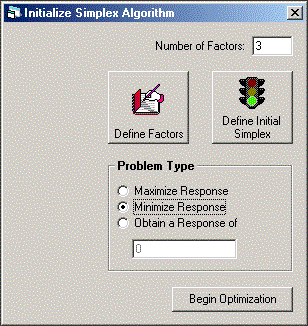
Set the number of factors to 3, and select Minimize Response as
the problem type. This is shown in the figure below.
-
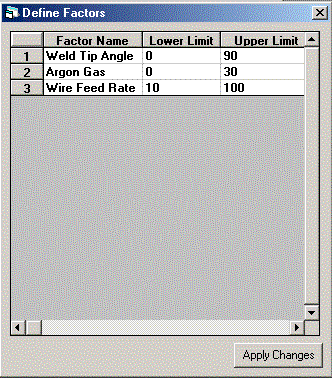
Click the Define Factors button and define the factors as shown in
the figure below.
-
Click the Apply Changes button, and the screen shown in Step 1
will be shown.
-
Click the Define Initial Simplex button, and complete the form as
shown below.
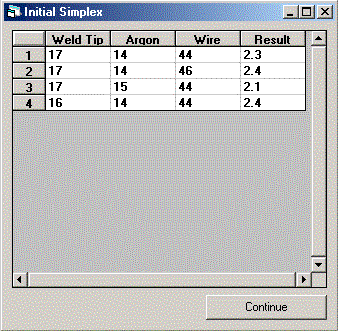
Since there are 3 factors, the initial simplex contains 4 experiments.
We have chosen the current production setting which yielded 2.3% scrap and 3
other experiments with slight changes in 1 factor each. The results
for these additional 3 experiments are the average from several thousand
trials. It is common to run production for more than a week with an
experimental setup. If this was an experiment conducted during the
research phase, the changes in the factor settings would be much
wider. They are held tight to prevent excess scrap from being
produced, but the trade-off of using such small changes is that it will take
longer to find the optimum settings.
-
Click the Continue button, and the screen shown in Step 1 will be
shown.
-
Click the Begin Optimization button and the screen below will be
shown.
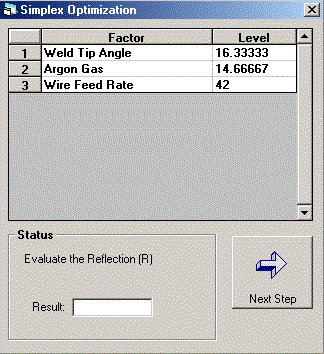
This screen shows the next experiment. Conduct enough trials with
these factor setting to be sure the result is either better or worse than
previous performance. Enter 2.0 and click the Next Step button.
-
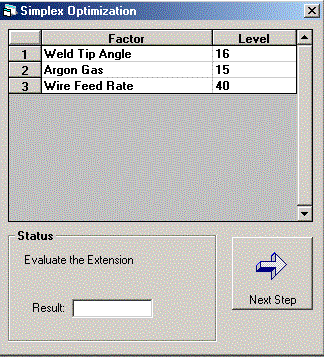
The factors settings for the next experiment are shown below.
-
Continue conducting experiments until you are satisfied that no further
improvements can be made.
-
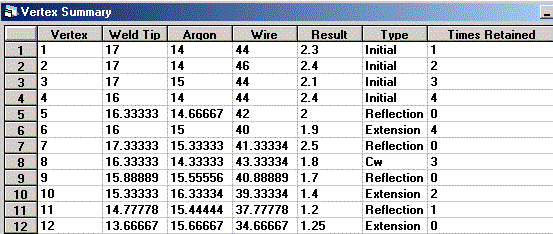
By selecting Vertex Summary from the Simplex menu a summary
of the experimental progress can be viewed. This is shown in the
figure below.
-
Selecting Response Graph from the Simplex menu gives a
graphical summary of the experimental progress. This is shown in the
figure below.

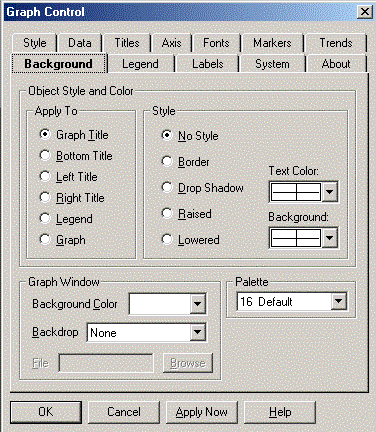
Right-clicking anywhere on the graph dialog provides a pop-up menu to
customize the graph. This is shown in the figure below.
-
Since it may take weeks to complete the trials for each experimental
setting, the problem should be saved after each step. When a file is
opened the problem will be resumed from the previous point.


